
Bricks is a WordPress theme for visually building and managing a site. Codeer Limited makes it and sells it through bricksbuilder.io. You purchase a license, download the theme, and activate it on your own WordPress site.
The price list is brief, so the choice mainly comes down to how many sites and how much time. This guide starts with the plan table, then explains the free playground, what each plan includes, a five year cost comparison, how to buy and activate, what happens when a license expires, and the few ways to pay less. If you are still deciding on a builder, compare it with Elementor pricing and Divi pricing.
What Bricks costs: four plans, one price each
Prices below come from the official Bricks pricing page as seen from the United States on 10 November 2026. Check the Bricks pricing page before you buy.
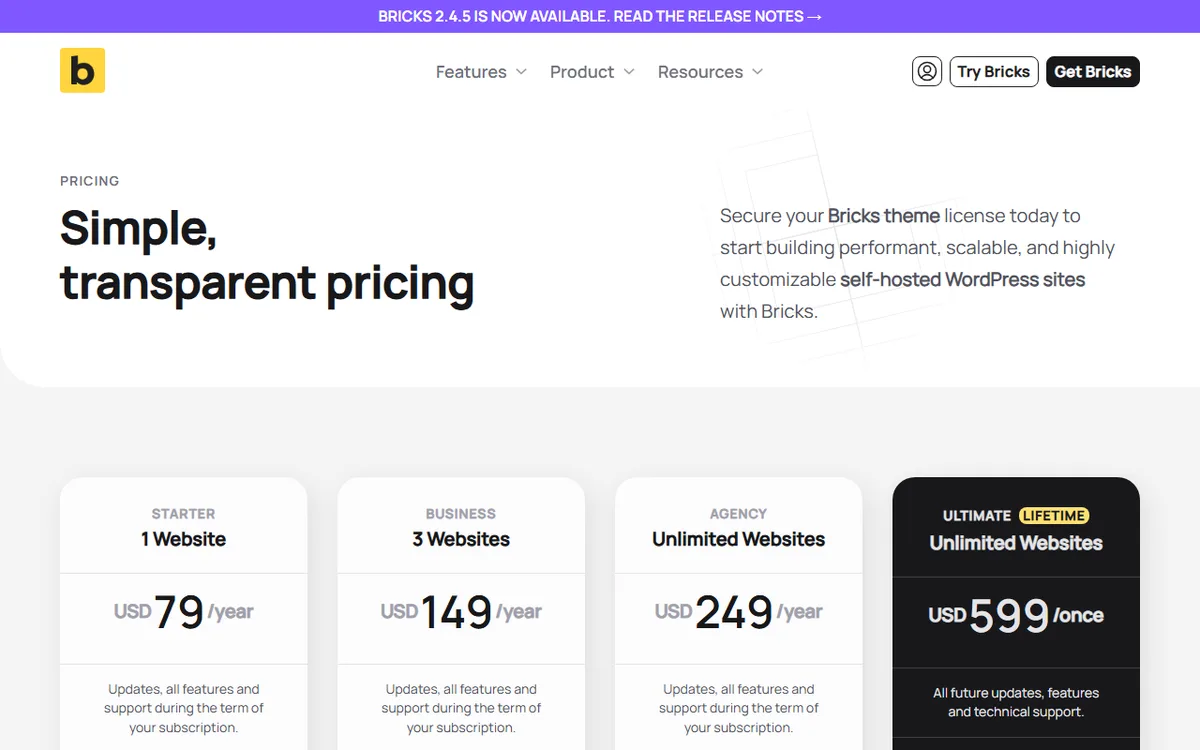
| Plan | Websites | Price | Billing |
|---|---|---|---|
| Starter | 1 | USD 79 | Per year |
| Business | 3 | USD 149 | Per year |
| Agency | Unlimited | USD 249 | Per year |
| Ultimate Lifetime | Unlimited | USD 599 | Once |
The three yearly plans renew annually until you cancel. Ultimate Lifetime requires a single payment and includes all future updates and support. The Terms of Service state that an active subscription renews automatically, with the full amount billed at the end of its billing period.
The prices shown do not include VAT and GST. Sales tax is added according to your country, and payments are processed through Paddle. This means your checkout total may be higher than the amount shown on the plan card.
Agency and Ultimate Lifetime are the only plans the pricing page identifies as eligible for the Bricks Expert Listing. This matters only if you want to be listed as a Bricks expert offering services to clients.
Is Bricks free? There is a free playground, not a free plan
The official pages do not describe a free version of Bricks, and no downloadable version is available to try. Instead, there is an online playground. Create an account at try.bricksbuilder.io to use the latest version for free.
You can test things without limit in the playground and experiment for as long as you like. It also provides access to Bricks Academy tutorials and guides. Bricks pages do not specify a time limit for the playground or explain its restrictions, so use it to learn the interface, not to run a live site.
If you choose to buy, the playground page directs you to get your own license. A purchase also includes a refund period, explained below, so the playground and the guarantee give you two low risk ways to try Bricks.
What every plan includes (the plans differ in sites, not features)
Each of the four plans includes all available features, regular updates, technical support by email and forum, and access to community templates. The pricing page names all 149 elements, the Query Loop Builder, Menu Builder, Popup Builder, WooCommerce Builder, and Conditions and Interactions. In other words, the lowest priced plan is not a cut down version.
The Built-in features page provides more information about what is included without extra plugins. It lists Ajax sorting and filtering for queries, popups with custom conditions, mega menu support, WooCommerce variation swatches, a Form Element with email notifications and built-in spam protection, a Font Manager with Google Fonts and Adobe Fonts, and Google Maps and Leaflet maps.
That page does not explain which features come with each plan, and it lists no plan names or prices. Plan differences appear on the pricing page, where they depend on the number of websites and the subscription term.
What counts as a site
Local and staging sites are not included in your limit. Every other WordPress installation or site URL requires an active license, and each subsite in a multisite counts separately. A client site, a personal site, and a shop at a separate URL count as three sites.
If you reach the limit, free up a slot by deactivating the license key on a site or removing that site from the Sites tab in your Bricks account.
Which plan to choose, with the five year maths
- One site of your own: Starter costs USD 79 a year.
- Your site and up to two others: Business costs USD 149 a year. At three sites, that comes to about USD 49.67 per site per year, less than the USD 237 cost of three Starter licenses.
- Many client sites: Agency costs USD 249 a year, or choose Ultimate Lifetime if you plan to build with Bricks for several years.
The table below uses simple arithmetic based on the listed prices. It assumes prices remain unchanged, you renew each year, and taxes are excluded. Prices may change, so recalculate on the day you buy.
| Years | Starter | Business | Agency | Ultimate Lifetime |
|---|---|---|---|---|
| 1 | USD 79 | USD 149 | USD 249 | USD 599 |
| 2 | USD 158 | USD 298 | USD 498 | USD 599 |
| 3 | USD 237 | USD 447 | USD 747 | USD 599 |
| 4 | USD 316 | USD 596 | USD 996 | USD 599 |
| 5 | USD 395 | USD 745 | USD 1,245 | USD 599 |
Ultimate Lifetime costs less than Agency in year 3, when renewals total USD 747 compared with a one time USD 599. On paper, Lifetime costs less than Business starting in year 5, and it does not cost less than Starter within five years. The lifetime license therefore pays off for people who need unlimited sites and plan to stay, not for a single site.
One note about the word lifetime. The Terms of Service state that lifetime licenses receive updates and support while Bricks remains in active development. It covers the life of the product, not a promise that Bricks will never change.
Choosing Bricks instead of a competitor is a separate decision. For a direct comparison of price and features, read Bricks vs Elementor, or compare Divi vs Elementor. For a broader view, see the WordPress page builders overview.
How to buy, install and activate Bricks
The pricing page itself does not provide download or installation instructions, so these steps are from the Bricks Academy. Your account and downloads are available at my.bricksbuilder.io. You will find the theme ZIP and your license key there.
- Make sure your host meets the Bricks requirements for PHP, database, memory, upload size and a modern browser. The requirements page specifies PHP 5.4+, a WordPress memory limit of at least 64 MB (512 MB recommended) and an upload size of at least 64 MB.
- Sign in at my.bricksbuilder.io and download the newest Bricks ZIP.
- In WordPress, navigate to Appearance > Themes > Add New > Upload Theme. Bricks is a theme, not a plugin. Choose bricks.zip, select Install Now, then select Activate.
- Go to Bricks > License or use the dashboard notice. Copy your license key from your account, paste it into the license field, then select Activate License.
After the key is active, update notices show up in your WordPress dashboard, and you can update with one click. Another option is to manually download the newest ZIP from your account. Bricks recommends updating on a staging server first and provides a changelog for every release.
For cloned sites, blueprint sites or code managed setups, you can define the key as the BRICKS_LICENSE_KEY constant in wp-config.php. The Academy says this works starting with Bricks 2.4.
By default, you can activate a key on any site running the Bricks theme until you reach the site limit. To control where it can be used, use the URL whitelist and blacklist in the Sites tab of your account. The Bricks licensing service enforces these restrictions, not the theme on your site. The Academy also notes that removing a site from the list will not keep it from returning, so add it to the whitelist or blacklist as well.
The pricing page does not list WordPress version requirements, and the pages used for this guide do not specify when Bricks was first released. If your hosting is old, ask your host or check the Bricks requirements page. If you are new to WordPress itself, begin with how to build a WordPress site.
What happens when a Bricks license ends
When you cancel a subscription, the license remains active until the current billing period ends. After that, its status changes to canceled, and you lose updates, support and access to community templates. You can continue editing your Bricks sites as before.
The Terms of Service include a condition. You can continue using the license after the cancellation date only if at least one yearly subscription payment was successful and not refunded. So if you received a full refund for a subscription, you no longer have a usable license.
The pricing page notes that outdated software poses an inherent security risk when a canceled subscription no longer receives updates. In plain terms, your sites still work, but you are responsible for security fixes, which Bricks does include in its releases. Releases 2.4.4 and 2.4.3 both mention them.
Once cancellation takes effect, a canceled subscription cannot be restored. You would need to buy a new subscription at the current price. You can undo a cancellation request before it takes effect, so act quickly if you cancel by mistake.
Refunds, and how to switch from a subscription to lifetime
The pricing page advertises a 60 day money back guarantee. The Terms of Service state that a purchaser who is not fully satisfied qualifies for a full refund during the first 60 days after the initial license purchase. The policy excludes subscription renewals and plan upgrades, while renewals have a 30 day grace refund period.
The pricing page also says that if 60 days have passed but your subscription has not renewed yet, you can email to request a refund for the remaining subscription value.
If you begin with a yearly plan and later decide you want lifetime, the pricing page lists the steps. Log in to your Bricks account, purchase Bricks Ultimate, activate the Ultimate key on all your existing and new Bricks sites, then cancel your old subscription using the red Cancel button on the licenses page of your account.
Since upgrades are not covered by the 60 day refund policy, decide before paying. The five year table above is the fastest way to see if lifetime is right for you.
Ways to pay less
- Choose the smallest plan that works for you. Every plan includes the same features, so Starter costs a third of Agency while offering the same tools.
- Use local and staging sites without worry. They do not count toward your site limit, so you can build and test without taking up a slot.
- Try the playground first. It is free, has no stated time limit, and lets you learn the builder before you pay.
- Use the refund period if the fit is not right. You have 60 days from your first purchase.
- Choose lifetime only when the math supports it. Three or more years with unlimited sites favors Ultimate over Agency.
- Use one Business license for your own three sites rather than purchasing three Starter licenses.
The pages used for this guide do not list coupon codes or seasonal discounts, and the affiliate program has not launched. Be cautious with third party coupon sites. You can check the price on the official pricing page.
Sources
- Terms of Service
- Installing and setting up
- Requirements
- Bricks pricing page
- Try Bricks demo
- Features built in
- License, updates, and your account
- Limit License Key Usage
- Change Log
- Affiliate Program
Frequently asked questions
How much does Bricks cost?
Starter costs USD 79 per year for 1 website, Business costs USD 149 per year for 3, Agency costs USD 249 per year for unlimited websites, and Ultimate Lifetime costs USD 599 once for unlimited websites. Taxes are added during checkout.
Is there a free version of Bricks?
The official pages say there is no free version or downloadable trial. To try the latest version online for free, create an account at try.bricksbuilder.io.
Is the Bricks lifetime license worth it?
The one time cost is USD 599, and it includes updates and support while Bricks remains in active development. Compared with the USD 249 Agency plan, it pays off in year 3 if prices remain the same.
What happens if I stop paying for Bricks?
Your license remains active through the end of the billing period. After that, updates, support, and community templates are no longer available, but you can still edit your Bricks sites.
Does Bricks have a refund?
Yes. The Terms of Service provide a full refund within 60 days of the initial license purchase. Renewals qualify for a 30 day grace refund period, and upgrades are not covered.