
Beaver Builder offers four annual WordPress page builder plans, which mainly differ in the number of live sites you can run. Each plan is billed annually and renews automatically, and lifetime licenses are not available.
This page shows the price for each plan, explains what the free Lite plugin includes and leaves out, and describes what stops working if you do not renew. If you are still comparing builders, the WordPress page builders overview compares them side by side, while the Elementor pricing and Divi pricing pages explain two common alternatives.
Beaver Builder plans and prices
Prices below come from the Beaver Builder pricing page as seen from the United States on 10 November 2026. Check that page before you buy, because prices change.
| Plan | Price per year | Live sites | Beaver Builder AI | Multisite support | White labeling |
|---|---|---|---|---|---|
| Starter | $89 | 1 | No | No | No |
| Plus | $179 | 3 | Yes | No | No |
| Professional | $299 | 50 | Yes | Yes | No |
| Unlimited | $546 | Unlimited | Yes | Yes | Yes |
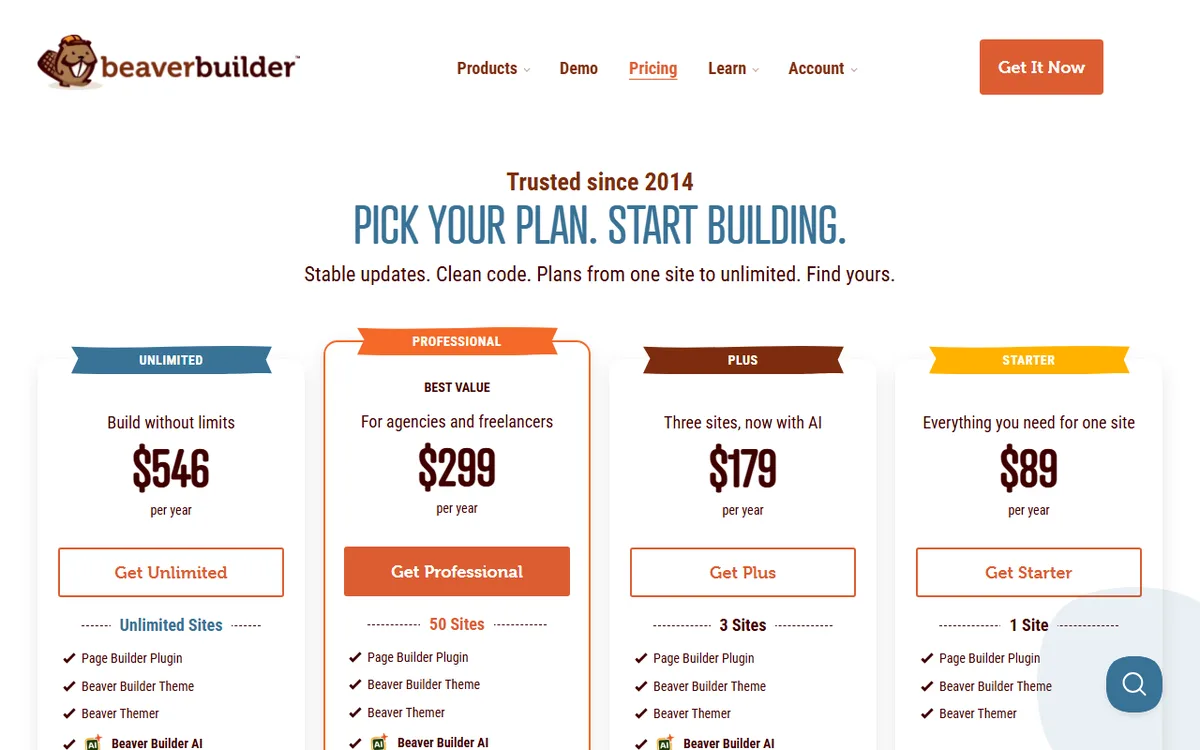
The screenshot displays the four plan cards in this order: Unlimited, Professional, Plus and Starter. Professional is marked as best value and described as the plan for agencies and freelancers. Starter is labeled as everything you need for one site.
Only live production sites count toward your limit. Beaver Builder does not count staging and development sites it recognizes as such, so you can build and test on a copy without using a slot.
What every plan includes
You do not pay extra for features people often think are add-ons. Every plan includes the Page Builder Plugin, the Beaver Builder Theme, Beaver Themer, the Loop Builder, WooCommerce support, product updates and email support. Unlimited also includes priority email support.
Beaver Themer designs headers, footers, post templates and archives, while the page builder designs individual pages. It comes with every plan at no extra cost, but does not work with the free Lite plugin.
Modules are the elements you drag onto a page. The official modules page says every plan includes them and groups them into standard, media, layout, posts and WooCommerce modules. WooCommerce modules can display products, the cart, checkout and My Account on regular WordPress pages.
Is there a free version of Beaver Builder
Yes. Beaver Builder Lite is a free plugin in the WordPress.org plugin directory, and Beaver Builder recommends installing it to check whether the builder works with your other plugins.
The listing says Lite includes content modules such as Box, Photo, Button, Heading, Text Editor, HTML, Audio, Video and Sidebar. It also supports full-width column layouts, responsive layouts, WordPress widgets and shortcodes, and use with pages, posts and custom post types.
The list of features you lose by staying on Lite is longer. The plugin listing identifies these as premium features:
- Additional modules include Contact Form, Tabs, Slider, Pricing Table, Map, Blog Posts and Subscribe Form.
- Beaver Themer, the theme-building tool, and the Beaver Builder Theme.
- Ready-made layout templates, along with reusable full-page layouts, rows and modules.
- Global color and style tools, expert support and Beaver Builder AI.
Lite may also come bundled with a theme you purchase. Beaver Builder does not allow any premium package to be bundled with a theme.
Trial, demo and refunds
The official pages offer a free live demo, not a trial. You can try every feature in the demo without an account or installation. If you buy and then change your mind, you can get a refund on your first purchase by asking within 30 days. Repeat purchases are never refundable, and Beaver Builder's terms and conditions have the complete rules.
What the paid plans add as you move up
Since the core builder is identical across plans, moving from one plan to another mainly changes the site count and adds a few extras.
- Starter to Plus. You move from 1 site to 3 and get Beaver Builder AI, which creates editable Beaver Builder modules instead of code blocks. Plus also comes with the MCP Connector, allowing MCP-compatible agents to create native Beaver Builder elements and Themer layouts on a WordPress site.
- Plus to Professional. You move from 3 sites to 50 and get WordPress Multisite support with network management.
- Professional to Unlimited. You remove the site limit and get white labeling, advanced training, Assistant Pro for 6 months free and priority support.
White labeling allows an agency to swap the words Page Builder or Beaver Builder, along with the Beaver Builder logo, for its own name or logo. This change affects only the website backend.
Which plan to choose
Estimate how many live sites you will run over the next year, then choose the smallest plan that covers them. Recognized staging copies are excluded, so count only sites visitors can access.
- One personal or business site: Starter at $89. The full builder, theme and Themer are included. Beaver Builder AI is not included.
- For up to three sites, or if you want AI: Plus at $179. For two sites, two Starter licenses cost $178 per year, nearly the same as Plus at $179. Plus is a better deal if you expect to add a third site within the year, since three sites cost about $60 each with Plus compared with $267 for three Starter licenses. It is also the least expensive plan that includes Beaver Builder AI and the MCP Connector.
- Freelancers and small agencies: Professional at $299. It supports 50 live sites, costing under $6 per site if you use all the slots. The page calls it best value.
- Large agencies or white label work: Unlimited at $546. This is the only plan that offers white labeling and has no site limit.
There is no lifetime option to compare with the yearly price, so the actual cost is the annual fee for each year you want updates and support. The next two sections describe what the fee covers.
If you are deciding between builders rather than plans, read Beaver Builder vs Elementor. If you are looking at third-party extensions, Beaver Builder add-ons covers the add-on options. The modules page says third-party add-ons are available as free and paid plugins.
How to buy, install and activate
You can buy a Beaver Builder license only through the official Beaver Builder website. Once you have purchased it, find the license key on that site's account page.
- Select a plan on the pricing page and purchase it.
- Add Beaver Builder to your WordPress site. The plugin listing says you can use the WordPress plugin directory or upload the files to
wp-content/plugins. - Turn on the plugin, then open Settings and select Beaver Builder to choose which post types it should work with.
- Copy your license key from the top of the My Account page on the Beaver Builder site. Click the key to copy it to your clipboard.
- In WordPress, go to Settings > Beaver Builder, click the License tab and paste the key. The documentation does not name a separate button for submitting it. A license connects the premium products on your site to the Beaver Builder update server, and activating it on a site turns on automatic updates and support for that domain.
- Open a page or post. You will see a Beaver Builder button in the editing area and a Beaver Builder option in the admin bar on the front end.
- Choose a pre-designed template or create a design from scratch.
First, check that your site meets the requirements. The WordPress.org listing requires WordPress 6.8 or higher and PHP 7.4 or higher. The system requirements page also says the WordPress REST API must be enabled. Visit /wp-json/ on your site to check. It recommends a memory limit of at least 128 MB, preferably 256 MB or more. For the recommended PHP version, it refers to the WordPress requirements page.
For more detailed license instructions, see the license documentation. For information on building a site in WordPress, see how to build a website with WordPress.
What happens when a license ends
All licenses are annual subscriptions. After the first year, you can renew to continue receiving updates and support. Licenses purchased after May 1, 2017 auto-renew by default. You can cancel at any time to stop automatic renewal at the end of the billing period, and your renewal date is listed on the My Account page.
A license also expires if a renewal payment fails due to a payment method issue, if you cancel the subscription, or if you request a refund.
Your sites will not break when the license ends. Beaver Builder continues to work on sites where it is already installed. However, you will no longer get new features, updates or support, and you cannot download the products from your account. You can still install copies you downloaded earlier, but only at the version available when the license expired.
The risk increases with time. Compatibility is guaranteed only for the latest version, so an old copy may eventually run into problems as WordPress, PHP, plugins or themes are updated. Beaver Builder itself recommends planning to switch to another page builder if you choose not to renew.
One additional point matters when budgets are tight. Renewals cost the regular annual price, so expect to pay the $89 to $546 amounts again each year. If your subscription renews automatically and you want to cancel, you have 30 days to request a refund. Some customers who purchased before October 13, 2022 may still be eligible for a grandfathered 40% renewal discount under their original terms. The discount does not carry over if you permanently move to a current plan.
Ways to pay less
Beaver Builder does not offer reusable public coupon codes. Approved discounts and short term promotions are provided through official links that apply the offer during checkout.
Eligible nonprofit organizations, students and teachers can receive 10% off a first purchase. This is a one-time discount that does not apply to renewals. Before buying, contact Beaver Builder and explain your organization or educational status. Be prepared to provide proof, such as nonprofit registration or current student or teacher status. Approved customers get an official discount link. Beaver Builder also recommends checking its pricing page and newsletter for current offers.
- Try it free first. Test the live demo, then install Lite on your own site to check compatibility before spending anything.
- Make free use of staging. Staging and development sites recognized by Beaver Builder do not count toward the limit, so a smaller plan may cover more work than expected.
- Choose the smallest plan that works. You can upgrade later at a prorated rate through the My Account page while logged in.
- Stop renewal or switch plans. You can disable auto-renewal through your account, and a license holder can move to a lower plan or the free Lite plugin. First check the grandfathered 40% renewal discount, because it does not transfer to a new plan.
- Request a refund within the window. You can get a refund for a first purchase by asking within 30 days, and you have 30 days to request a refund for an automatic renewal. Repeat purchases cannot be refunded.
- Retain an older renewal discount. If you purchased before October 13, 2022, you may be eligible for a 40% renewal discount. Renew within two weeks after expiration to keep it. You can also renew up to 30 days early.
Sources
- Beaver Builder Pricing
- License Management
- Features of Beaver Builder
- Beaver Themer
- Modules for Beaver Builder
- Beaver Builder FAQ
- Beaver Builder Lite (WordPress.org)
- Official Discount Information
- wpbeaverbuilder.com: Terms and conditions
- docs.wpbeaverbuilder.com: View and activate
- System Requirements
- License Expiry
- docs.wpbeaverbuilder.com: Renew
Frequently asked questions
How much does Beaver Builder cost?
Beaver Builder is $89 per year for Starter (1 site), $179 for Plus (3 sites), $299 for Professional (50 sites) and $546 for Unlimited. Every plan is billed yearly and renews automatically.
Is Beaver Builder free?
A free Lite plugin can be found in the WordPress.org directory, while Beaver Themer, the Beaver Builder Theme, extra modules, pre-made templates and Beaver Builder AI are premium features. A free live demo is available as well.
Does Beaver Builder have a free trial or refund?
The official pages describe a free live demo, not a trial. You can get a refund for your first purchase if you ask within 30 days, but repeat purchases are not refundable. After an automatic renewal, you have 30 days to ask for a refund.
What happens if I do not renew Beaver Builder?
Installed copies continue to work, but you no longer receive new features, updates or support. You also lose the ability to download products from your account, and older versions may eventually have compatibility problems.
Is there a lifetime license for Beaver Builder?
No. The license documentation states that lifetime licenses are not available to purchase. All licenses are annual subscriptions.