

Dated November 26, 2026, the announcement is for anyone who builds Vibe projects for clients or their own business. If a project needs a chatbot, cookie notice, accessibility tool or SEO helper, first check whether an app already exists. This is an initial release, though: Duda says its App Store does not yet include all apps in Vibe, and the selection will grow over time.
What is new
- You can browse and add third-party apps directly in a Vibe project.
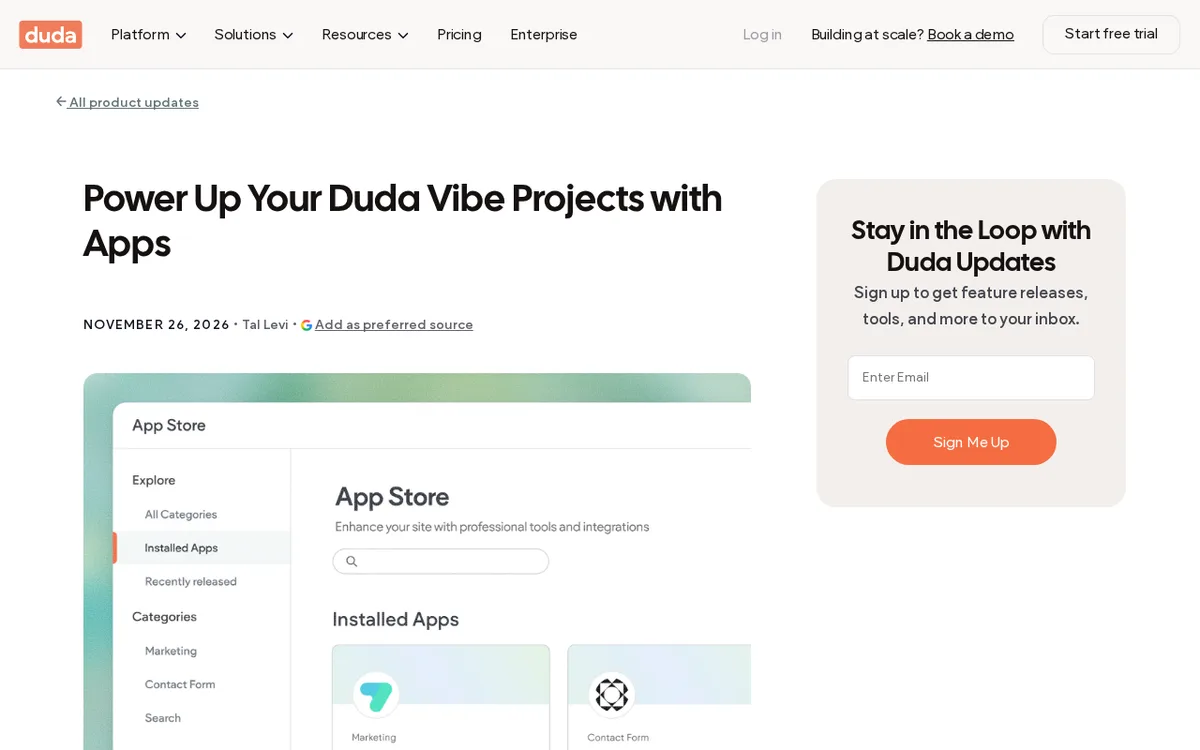
- The entry point is the App Store item in the project's right side panel.
- The first selection is ten apps in four groups: privacy and accessibility, AI chat, SEO and online visibility, and marketing and engagement.
- Duda describes apps as a way to add capabilities without building them from scratch.
Taken from the official update: duda.co [1]
Where to find apps inside a Vibe project
In your Duda Vibe project, select App Store in the right side panel and browse the available apps. Add the apps that fit the project, then follow each app's setup instructions to complete the process. Duda says apps give a project new capabilities without requiring you to build or develop them from scratch.
Fact checked on 27 Nov 2026 against duda.co [1]
Duda's November 26 post does not say what Vibe projects could install before this update. Duda's Product Terms already define a Vibe Project as including third party integrations and make the project owner responsible for them, which means integrations were part of the definition of a Vibe project. In its November 2, 2026 announcement, Duda described secure backend integrations for Vibe and said Duda Store and Bookings integrations were coming. Neither page says Vibe projects could install apps from the editor's App Store, making this update the first documented App Store route for Vibe.
Fact checked on 27 Nov 2026 against duda.co [3], blog.duda.co [4]
For comparison, Duda Support's App Store Overview for the editor shows 45 app entries in its table. The page does not give a total, so the number comes from counting the list. Vibe's ten apps are a smaller selection than the editor list.
Fact checked on 27 Nov 2026 against support.duda.co [5], duda.co [1]
What the first ten Vibe apps do
Termly and UserWay address privacy and accessibility. Termly scans and manages cookie consent and generates privacy policies and agreements. UserWay provides an accessibility widget that changes identified site elements to improve the browsing experience and support accessibility standards.
Fact checked on 27 Nov 2026 against duda.co [1], apps.duda.co [6], apps.duda.co [7]
Agentz.ai, ChatWith.io and CN: AI Chatbot are for AI chat and communication. Agentz.ai handles AI conversations across websites, SMS and social channels to capture visitors and provide sales and support around the clock. ChatWith is a white label WhatsApp solution offering forms, bookings, payments and AI agents. Duda's update gives no details about CN: AI Chatbot beyond its name and group.
Fact checked on 27 Nov 2026 against duda.co [1], apps.duda.co [8], apps.duda.co [9]
Frank SEO (by Alpha.ai), Google Search Console and TransUnion, formerly Neustar Localeze, are listed under SEO and online visibility. HelloBar and Subscribers.com are listed under marketing and engagement. Duda's update names these five apps by group but does not explain what each does, so check each app's profile before promising a client a result.
Fact checked on 27 Nov 2026 against duda.co [1]
Plans, prices and how far the selection goes
The Vibe announcement does not specify which plans include the integration. Duda's general App Store page says the App Store is available with Basic, Team, Agency or Custom accounts, while legacy accounts must upgrade to use it. The page does not specify which plans include the Vibe version, so consider that information background, not a guarantee.
Fact checked on 27 Nov 2026 against duda.co [2]
Regarding cost, Duda's general App Store page says app prices vary and are set by the app provider. It directs you to each app's profile for pricing. The Vibe announcement gives no prices, so check an app's cost before adding it to a client project.
Fact checked on 27 Nov 2026 against duda.co [2]
Duda says that not all App Store apps are available in Vibe yet and that the selection will expand over time, without giving a schedule. Check the App Store item in your project before promising a client a particular app. For a broader look at platform costs and who it suits, see the nvudev guide to the Duda website builder.
Fact checked on 27 Nov 2026 against duda.co [1]
What the official notes do not say
- The update does not say which Duda plans, account types or Vibe versions can use the App Store integration.
- It gives no price for the integration and no prices for the listed apps inside Vibe.
- It sets no limit on how many apps a Vibe project can hold, and gives no usage limits.
- It does not say whether Vibe projects could install any apps before November 26, 2026, and gives no rollout schedule beyond saying the selection will expand gradually.
How it helps: a freelancer who builds sites for local shops and generates first drafts in Vibe
The task. Before quoting a local business client, add a cookie consent tool such as Termly to a Vibe project
- Check that the account is Basic, Team, Agency or Custom and not a legacy account. Duda's FAQ says this about its App Store in general, not about Vibe specifically.
- Open the App Store item in the right side panel of the Vibe project and confirm the app you want is in the Vibe selection, since not all apps are there yet.
- Open the app's profile and read its price, which the app provider sets, before you quote the client.
- Add the app and complete its own setup instructions.
The result. The project gets the feature from an existing app rather than building it from scratch, and the client quote reflects the app's actual price.
Fact checked on 27 Nov 2026 against duda.co [1], apps.duda.co [6], duda.co [2]
Other ways to use it
The project needs tools to improve search visibility. The owner can check the SEO and online visibility group for Frank SEO, Google Search Console or TransUnion rather than building something similar.
Fact checked on 27 Nov 2026 against duda.co [1]
The site needs a promotional bar and a way to gather subscribers. HelloBar and Subscribers.com are listed in the first marketing and engagement group, making the App Store panel a good place to look.
Fact checked on 27 Nov 2026 against duda.co [1]
Related nvudev guides
Sources
- https://www.duda.co/product-updates/power-up-your-duda-vibe-projects-with-apps (official update)
- https://www.duda.co/website-builder/app-store
- https://www.duda.co/legal/product-terms
- https://blog.duda.co/everything-we-announced-at-dudacon26
- https://support.duda.co/hc/en-us/articles/360060106594-App-Store-Overview
- https://apps.duda.co/apps/termly
- https://apps.duda.co/apps/accessibility-by-userway
- https://apps.duda.co/apps/agentz.ai
- https://apps.duda.co/apps/chatwith---whatsapp-widget
Facts in this article were checked against these sources on 27 Nov 2026. Product details change, so check the official page before you rely on them.