

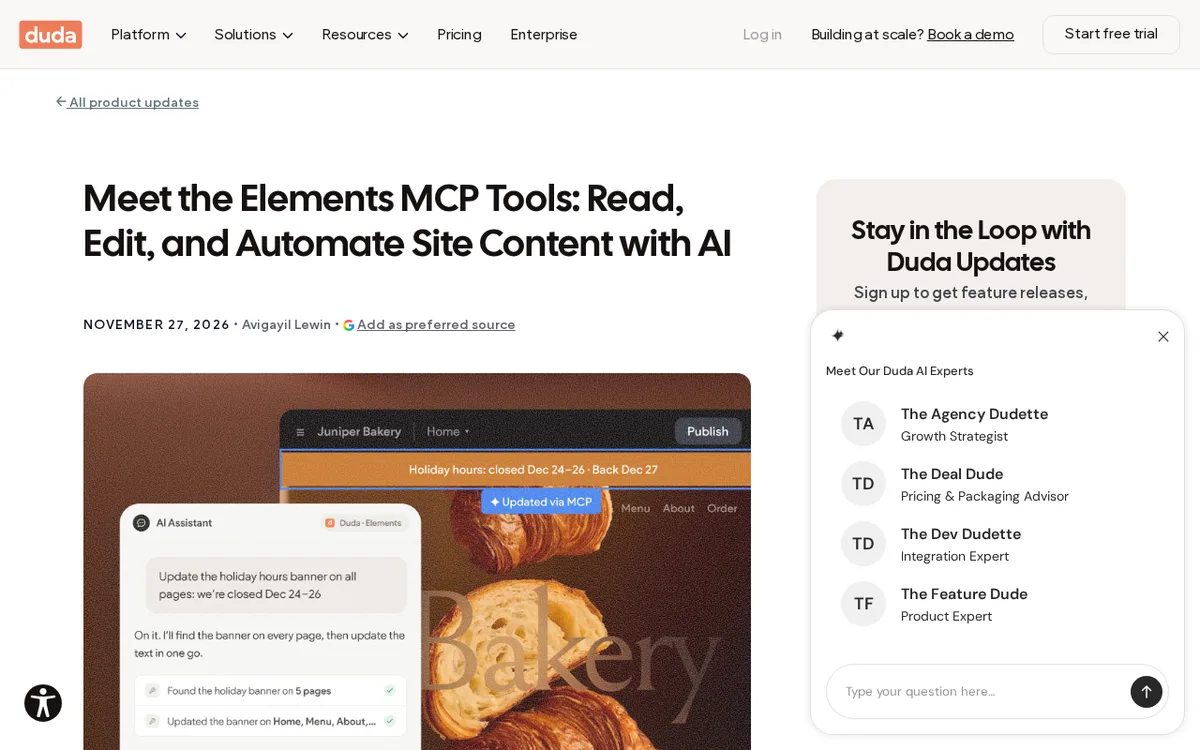
Previously, Duda's MCP tools worked with sites, stores and Bookings, content, collections, blogs and Vibe sites. The Elements tools work with individual page elements, including elements in the header and footer, even on sites with a store or bookings.
The Elements tools are available on all paid account plans with access to Duda's MCP, and usage limits differ by plan. The update does not list a separate price for the tools.
What is new
- Read site content: explore page structures, inspect elements, search the site's text and check which data connections are available.
- Edit elements: add, update, duplicate, move or delete elements on a page.
- Connect content to data: link elements to the Content Library or to collection data.
- Reach beyond one page: work on elements across pages, the header and the footer.
- Use the same capabilities in code through the Elements API, which Duda ties to the Custom plan.
Taken from the official update: duda.co [1]
What the Elements tools add to Duda's MCP
Duda presents Elements as an addition to its existing MCP tools. The MCP Server Reference already lists groups such as account tools for creating accounts and granting site access, blog tools for creating and publishing posts, and Content Library tools for reading, updating and publishing shared content. Those tools do not reach an individual banner or button on a page.
Fact checked on 28 Nov 2026 against duda.co [5], developer.duda.co [4]
The reference lists new Elements tools for reading, inserting, deleting, moving, duplicating and updating elements, as well as reading schemas, data bindings and site text. For changes to many elements at once, update_elements supports up to 200 elements per call, which can help when rolling out a promotion across a long page.
Fact checked on 28 Nov 2026 against developer.duda.co [4]
Flex sites and Editor 2.0 sites
The update says the Elements tools are for Editor 2.0 sites, while the reference labels get_page_elements as working on Flex sites only. Those details do not seem to conflict. Duda's Page Elements v2 documentation groups Flex with Editor 2.0 and says Classic Editor sites are not supported, but does not define Flex as a separate editor type or say the two terms are exact synonyms.
Fact checked on 28 Nov 2026 against duda.co [1], developer.duda.co [4], developer.duda.co [6]
Only one of the nine Elements tools in the reference, get_page_elements, is labeled Flex sites only. The Site Object documentation lists ADVANCED-2.0 as an editor type alongside ADVANCED, which fits the distinction between Editor 2.0 and the classic editor. The docs reviewed here do not explain how to check a client's site type, so confirm it in Duda before promising a workflow.
Fact checked on 28 Nov 2026 against developer.duda.co [4], developer.duda.co [7]
Plans, usage limits and setup
The pricing page lists monthly MCP call allowances of 125 for Basic, 250 for Team, 500 for Agency and 750 for White Label. Custom is listed only as Custom, and the page says calls reset each month. Duda does not explain whether a call means one tool invocation or one assistant request, so it is not yet possible to determine how many calls a single instruction uses.
Fact checked on 28 Nov 2026 against duda.co [1], duda.co [2]
To connect an assistant, Duda's setup guide directs you to Account Icon, then Account Settings, where you can find your MCP Server URL and Access Token. The guide also describes OAuth as one connection option and lists Claude, ChatGPT, Cursor and the OpenAI Responses API among its setup options.
Fact checked on 28 Nov 2026 against developer.duda.co [3]
Who can use it and who cannot
The tools are for Editor 2.0 sites on accounts with a paid plan that includes MCP access. They do not apply if your account lacks such a plan or if a client's site is not an Editor 2.0 site. The Elements API offers the same capabilities in code and comes with the Custom account plan, so the update does not cover anyone who wants it without that plan.
Fact checked on 28 Nov 2026 against duda.co [1]
The nvudev Duda guide provides a fuller picture of platform costs and who the platform suits.
What the official notes do not say
- The update does not name an existing Duda feature or tool that the Elements MCP tools replace.
- The update does not give the Elements MCP tools a separate usage quota, only saying that MCP limits vary by plan.
- The pricing page lists the Custom plan's MCP allowance as Custom rather than as a specific number of calls.
- The pricing page does not define whether one MCP call is a single tool invocation or a single assistant request.
- The update does not state a separate price for the Elements tools or a rollout schedule beyond the dated announcement.
How it helps: a freelancer or small agency that looks after several local business sites built in Duda Editor 2.0
The task. Update a banner or promotion shown on many pages without opening each page in the editor
- Confirm in Duda that the site is an Editor 2.0 site, since get_page_elements works on Flex sites only.
- Open Account Settings in Duda and copy the MCP Server URL and Access Token.
- Add them to your AI assistant, for example Claude or ChatGPT, using Duda's MCP setup guide.
- Ask the assistant in plain language to find the banner and search the site text to locate every place it appears.
- Ask it to update those elements. One update_elements call handles up to 200 elements, and the work draws on your plan's monthly MCP allowance, for example 125 calls on Basic or 500 on Agency.
The result. One edit can update the pages, header and footer without opening each page, though making a change across many client sites uses some of the monthly allowance, which resets each month.
Fact checked on 28 Nov 2026 against duda.co [1], duda.co [2], developer.duda.co [3], developer.duda.co [4]
Other ways to use it
Use the Elements API to read site data from your own system for reporting.
Fact checked on 28 Nov 2026 against duda.co [1]
Related nvudev guides
Sources
- https://www.duda.co/product-updates/meet-elements-mcp-read-edit-and-automate-site-content-with-ai (official update)
- https://www.duda.co/pricing
- https://developer.duda.co/docs/duda-mcp-server
- https://developer.duda.co/docs/mcp-server-reference
- https://www.duda.co/pt/product-updates/meet-elements-mcp-read-edit-and-automate-site-content-with-ai
- https://developer.duda.co/reference/page-elements-v2
- https://developer.duda.co/reference/sites-object
Facts in this article were checked against these sources on 28 Nov 2026. Product details change, so check the official page before you rely on them.