

There is one firm requirement: WAF needs a custom domain on Webflow's Cloudflare infrastructure. Legacy domains and webflow.io domains are not supported. WAF is also an Enterprise feature. Webflow's pricing page and WAF help article list the built-in WAF on Enterprise plans, so non-Enterprise Site plans do not include it.
What is new
- The built-in WAF is available on all Enterprise plans at no additional cost.
- Rules can match country, IP address, ASN, user agent (including browser version) and URL path.
- Rules are written in JSON, by you or drafted by an AI assistant connected to Webflow's MCP server.
- Policy changes can be previewed in staging, and a warning appears before you save a rule that would block all traffic.
- Every rule change is logged in the site audit log with a timestamp and a name.
Taken from the official update: webflow.com [1]
What the rules can filter and how you change them
Rules can allow or block traffic to a custom domain. Webflow lists country, IP address, ASN (the network a visit comes from), user agent, including browser version matching, and URL path as options for matching traffic. You can apply rules to specific paths, treating one part of a site differently from the rest. Webflow also says the same rules can prevent bandwidth overages caused by bots and scrapers.
Fact checked on 21 Nov 2026 against webflow.com [2], webflow.com [1]
Rules use JSON. You can write the JSON yourself in Webflow or ask an AI assistant connected to Webflow's MCP server to draft it. If JSON is not your thing, the second option may be worth considering, though that is the author's suggestion, not Webflow's. Before a change goes live, you can preview it in staging and validate it when publishing. WAF also warns you before you save a rule that would block all your traffic.
Fact checked on 21 Nov 2026 against webflow.com [2], webflow.com [1]
The site audit log records every rule change, along with its timestamp and the name of the person who made it. This is helpful when several people can edit the same site.
Fact checked on 21 Nov 2026 against webflow.com [1]
Who gets it and what it replaces
The built-in WAF is available on Enterprise plans, not non-Enterprise Site plans. Those other plans have separate bot-related controls: Webflow lists crawler access settings to allow or block search engine crawlers and AI bots, and a paid Workspace plan is required to access them on a Starter site. These settings are not the WAF and cannot filter traffic by country, IP, ASN or path.
Fact checked on 21 Nov 2026 against webflow.com [3], webflow.com [1]
You can keep your own WAF if you already use one. Webflow says customers can continue using their own WAF with Cloudflare Orange-to-Orange (O2O). According to Webflow's help article, O2O works only after a site moves to Webflow's Cloudflare infrastructure. Sites created after 21 April 2025 are already on it, while older sites need to change their custom domain DNS to Webflow's new records. O2O also requires a Cloudflare account, a custom domain and a paid Webflow Site plan, but not a specific Cloudflare plan, because it can be enabled on Cloudflare's Free plan.
Fact checked on 21 Nov 2026 against webflow.com [1], help.webflow.com [4]
The main difference is who manages the rules. The built-in WAF keeps them in Webflow, alongside the audit log. O2O leaves them in the firewall you already use.
Fact checked on 21 Nov 2026 against webflow.com [1]
Requirements and limits to check first
WAF needs a custom domain on Webflow's Cloudflare infrastructure. A site using a webflow.io address is not covered.
Fact checked on 21 Nov 2026 against webflow.com [1]
Webflow says WAF puts availability first. If it cannot evaluate a request, the traffic still reaches the site without the rules being enforced. The firewall fails open, so in that rare case a visitor you meant to block could get through, but the site remains available.
Fact checked on 21 Nov 2026 against webflow.com [1]
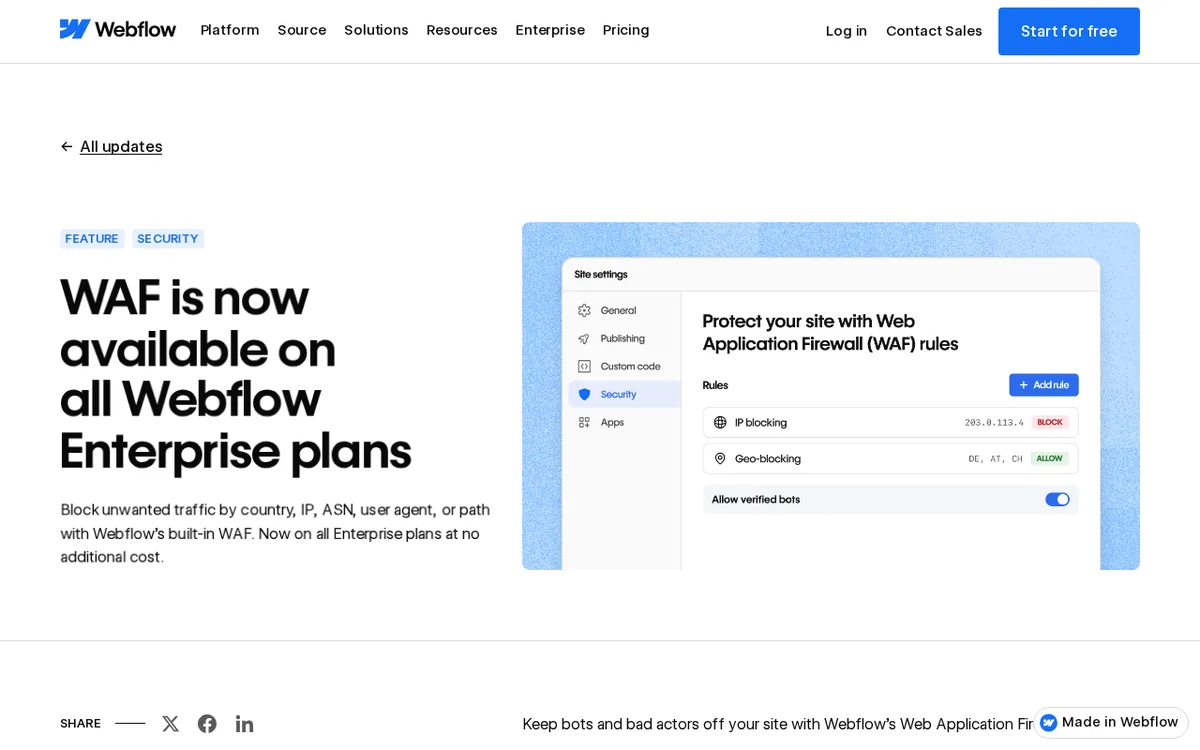
In Webflow's picture of its Security screen, an Allow verified bots switch is shown. When enabled, bots verified by Cloudflare bypass your WAF rules. This includes major search engine crawlers such as Googlebot, while Webflow's own protections remain in place. If your site relies on search traffic, understand this setting before writing a broad bot rule.
Fact checked on 21 Nov 2026 against github.com [5]
What the official notes do not say
- The official Webflow pages do not say whether, before 18 November 2026, WAF was limited to selected Enterprise customers or in beta, or when any earlier access began.
- The official pages reviewed do not give numeric limits for the number of rules, requests or domains.
- They do not name an existing Webflow feature that WAF replaces, only that it avoids setting up and maintaining another third-party app.
- The pages reviewed do not specify where in the Webflow dashboard to find WAF.
How it helps: a developer who runs a company marketing site on a Webflow Enterprise plan and already pays for a separate firewall
The task. Choose whether to switch to the built-in WAF or keep the existing firewall, then block the scraper consuming bandwidth.
- Check that the site uses a custom domain on Webflow's Cloudflare infrastructure, because webflow.io and legacy domains are not supported.
- Decide on the firewall. Keep the current one through Cloudflare Orange-to-Orange, or switch to the built-in WAF, which adds no cost on Enterprise.
- If you use the built-in WAF, write a JSON rule that blocks the scraper by user agent or by the URL paths it hits, or ask an AI assistant connected to Webflow's MCP server to draft it.
- Leave Allow verified bots on so search engine crawlers such as Googlebot still get through, then preview the change in staging and heed any warning about blocking all traffic.
- Publish, then check the audit log for the rule change with your name and a timestamp.
The result. A rule blocks the scraper, leaves search crawlers unaffected, and makes the change traceable.
Fact checked on 21 Nov 2026 against webflow.com [2], webflow.com [1], github.com [5]
Other ways to use it
The built-in WAF is not included, so country, IP, ASN and path rules are unavailable. Crawler access controls for search engine crawlers and AI bots are a separate option.
Fact checked on 21 Nov 2026 against webflow.com [3]
Related nvudev guides
Sources
- https://webflow.com/updates/waf (official update)
- https://webflow.com/security
- https://webflow.com/pricing
- https://help.webflow.com/hc/en-us/articles/45039458051347-Using-Cloudflare-Orange-to-Orange-O2O-with-Webflow
- https://github.com/webflow/webflow-skills/blob/main/plugins/webflow-skills/skills/waf-rules/SKILL.md
Facts in this article were checked against these sources on 21 Nov 2026. Product details change, so check the official page before you rely on them.