
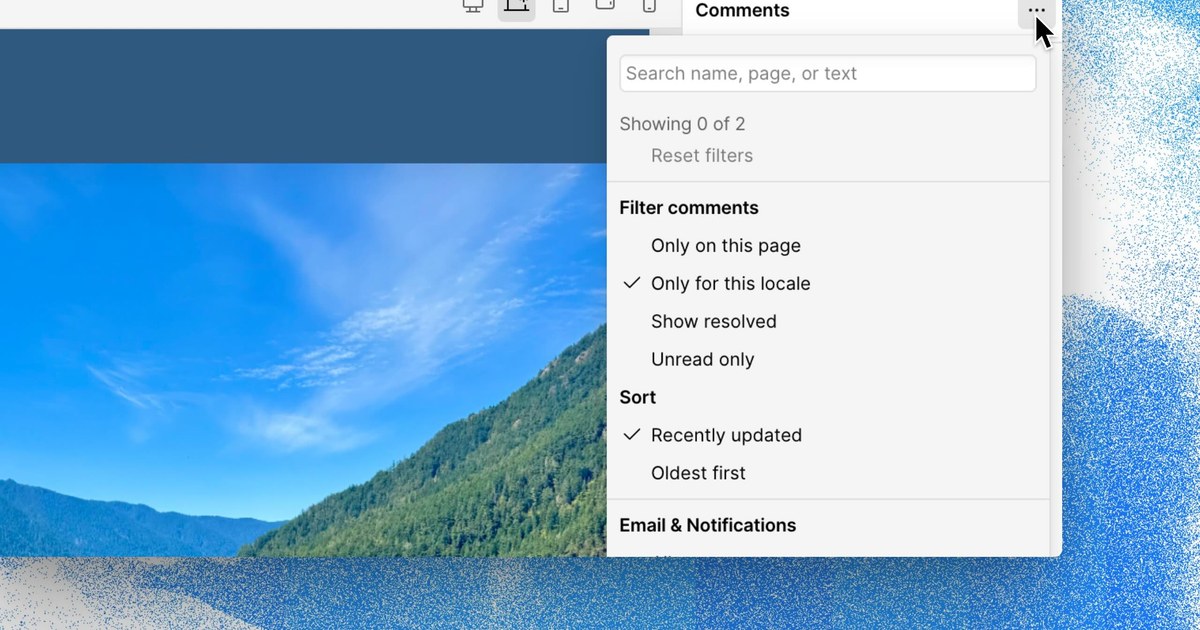
When you build client sites in Webflow, a review round can leave a site full of notes from many people across many pages. The new controls help you find the comments that matter without scrolling through the entire list.
What is new
- Search comments by commenter name, page name or comment text.
- Filter by Unread only, Author, Page or Locale.
- Sort by Recently updated or Oldest first.
- A dot appears when filters are active, so you can tell your view is filtered.
Taken from the official update: webflow.com [1]
Which control suits which job
Before this update, Webflow's help page described two ways to narrow the Comments panel: filter by the current page or by resolved comments. The announcement does not say whether the new controls replace those options, so treat them as additional choices for the same panel. You can now narrow a long list by person, language or unread status, as well as by page or status.
Fact checked on 14 Nov 2026 against help.webflow.com [2], webflow.com [1]
Search is the fastest option when you remember something about a note. Enter a client's name to find what they wrote, a page name to see feedback on that page, or a phrase you partly remember. Filters work well for a planned review. Use Page to review a site one page at a time, Author to read everything one person raised, and Locale for a site with multiple languages. When you return after a few days away, start with Unread only.
Fact checked on 14 Nov 2026 against webflow.com [1]
Sorting controls which comments appear first. Recently updated puts active conversations at the top, while Oldest first helps you work through a backlog in the order comments were raised.
Fact checked on 14 Nov 2026 against webflow.com [1]
Filters can hide comments, and Webflow displays a dot whenever a filter is active. If a comment appears to be missing, check for the dot before assuming it was deleted.
Fact checked on 14 Nov 2026 against webflow.com [1]
Plans, access and limits
The update announcement does not clarify whether the search, filter and sort controls are available on every Site or Workspace plan. Webflow's Comments help article also does not specify plan tiers, and the site roles and permissions page lists creating, viewing and resolving comments for every role shown without linking those abilities to a plan. Neither page lists a price for these controls.
Fact checked on 14 Nov 2026 against help.webflow.com [2], help.webflow.com [3], webflow.com [1]
Search is especially useful on large sites. Webflow documents a limit of 20,000 comment threads per site and up to 50 replies per thread. Resolved threads count toward the limit, but deleted comments do not.
Fact checked on 14 Nov 2026 against help.webflow.com [2]
If you are choosing a Webflow plan for a client project, the Webflow pricing guide explains the site plans, while the Webflow overview describes what the builder does.
What the official notes do not say
- The update does not name the plans or versions that get the new search, filter and sort controls, and it gives no rollout schedule beyond the launch date.
- The update does not mention a price or a limit that applies only to these controls.
- The update does not say whether the new controls replace the existing current page and resolved comment filters.
How it helps: a freelancer who builds sites for small businesses and collects feedback from clients inside Webflow
The task. Handle a round of client feedback on a site with many pages and comments
- Open the Comments panel on the site.
- Turn on Unread only so you see just the notes you have not read yet.
- Filter by Page to handle one page at a time, or by Author to read everything one client wrote.
- Type a word from a half remembered note into the search to find it by comment text.
- Switch the sort to Oldest first to deal with the longest waiting requests before newer ones.
The result. You spend less time scrolling and more time responding to feedback that is waiting for you, while the dot shows when a filter remains on.
Fact checked on 14 Nov 2026 against webflow.com [1]
Other ways to use it
A project manager uses the Locale filter to view comments for one language, then selects Unread only to check what has been posted since the previous review.
Fact checked on 14 Nov 2026 against webflow.com [1]
Before the call, the owner filters by the client under Author and sorts by Recently updated, putting the latest things the client wrote or answered at the top.
Fact checked on 14 Nov 2026 against webflow.com [1]
Related nvudev guides
Sources
- https://webflow.com/updates/search-filter-sort-comments (official update)
- https://help.webflow.com/hc/en-us/articles/33961339882131-Comments
- https://help.webflow.com/hc/en-us/articles/41015796747667-Site-roles-and-permissions
Facts in this article were checked against these sources on 14 Nov 2026. Product details change, so check the official page before you rely on them.