
The Free plan offers limited Agent, Chat and Tab usage, letting you try Cursor fully before paying. Teams costs $30 per user a month for groups, while Enterprise pricing is provided by quote.
Cursor plans are now sold with Grok models and X features, so some plan lines are X perks rather than coding tools. Check usage limits and third-party model costs separately.
Cursor plans and prices
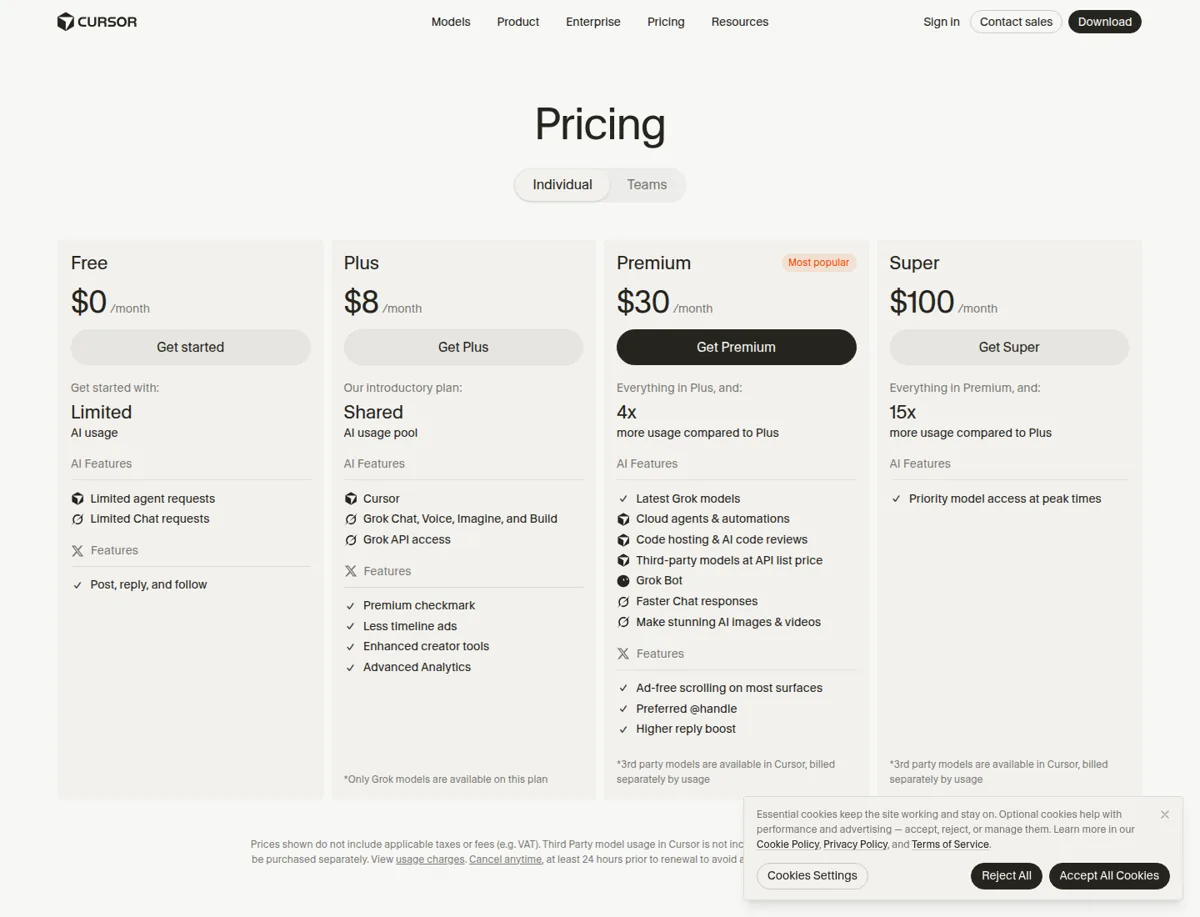
Prices below come from Cursor's official pricing page as seen from the United States on 4 November 2026. Prices exclude applicable taxes or fees and are subject to change. Check Cursor's pricing page before you buy.
| Plan | Monthly price | Annual price |
|---|---|---|
| Free | $0 | Not applicable |
| Plus | $8 | $80 a year |
| Premium | $30 | $300 a year |
| Super | $100 | $1,000 a year |
| Ultra | $200 | $2,000 a year |
| Teams | $30 or more per user | See Cursor's Teams page |
| Enterprise | Custom | Contact sales |
Cursor's pricing help article provides the annual prices for individual plans. The Teams documentation describes an option to pay yearly and save 20%, but gives no annual dollar totals, so check the amount at checkout.
The individual plans below are those listed for the United States. Cursor also offers a Start plan only in India, which is not covered here.
What each plan includes, as the page states it
- Free ($0): limited AI usage, limited Agent requests, limited Chat requests, and the line "Post, reply, and follow", which appears to be an X feature.
- Plus ($8): presented as the introductory plan. The page lists a shared AI usage pool, Grok Chat, Voice, Imagine and Build, Grok API access, a Premium checkmark, fewer timeline ads and enhanced creator tools. Only Grok models are included with Plus.
- Premium ($30): 4x the usage of Plus, the latest Grok models, cloud agents and automations, code hosting and AI code reviews, third-party models at API list price, and Grok Bot. Cursor recommends Premium for new AI users.
- Super ($100): 15x the usage of Plus and priority model access during peak times. Cursor recommends it for people who use Agent daily.
- Ultra ($200): 50x the usage of Plus and earliest access to all products and models. Cursor recommends it for power users.
- Teams ($30 or more per user): for professionals who collaborate, with pooled usage at 4 to 50 times Plus, a team marketplace for internal rules, skills and plugins, centralized billing, usage analytics, team privacy settings and SAML or OIDC single sign-on.
- Enterprise (custom): designed for larger organizations that require invoicing, shared usage or advanced security, and offers invoice or purchase order billing, SCIM seat management, detailed spend controls, audit logs, service accounts and priority support.
Items such as the Premium checkmark, fewer timeline ads and posting are X features listed in the same plans. If you only want the code editor, you can ignore them. Our guide to Cursor AI features explains what the editor itself does.
Why Grok and X appear on Cursor's pricing page
Cursor's plans are now offered through The X Subscription, which accounts for the Grok and X items. In its blog post "Cursor is now a part of SpaceX", dated August 14, 2026, Cursor says SpaceX acquired the company, completing a process that started in April. The post says Cursor will use SpaceX's computing capacity to create stronger models that cost less to run.
Subscriptions are available only directly from X Subscription Corp. Cursor says it does not approve resellers or third-party sellers.
How usage billing works
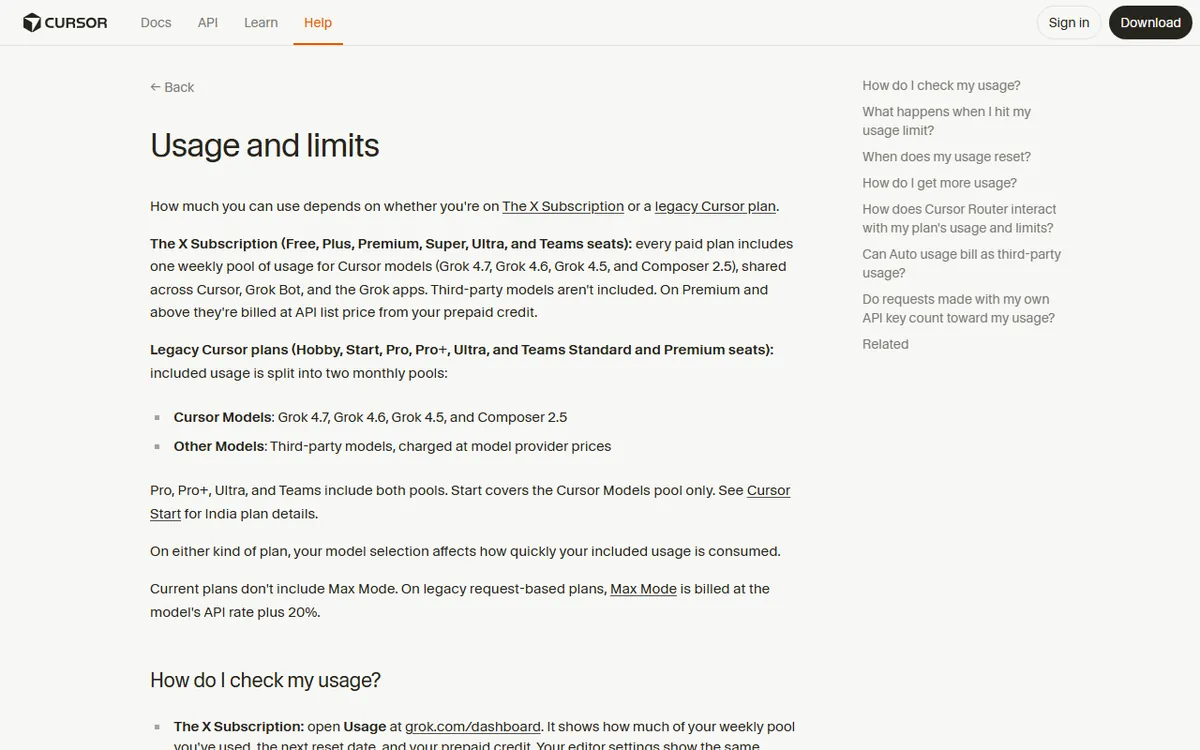
All paid plans come with a pool of Cursor model usage. With current paid plans, the pool renews weekly, and unused usage does not carry over. Legacy plans are different, resetting monthly with the billing cycle.
If you need more, purchase prepaid credit. Top up whenever you want, or enable Auto Top-up to refill the balance when it drops below a threshold you choose. A monthly additional-usage limit serves as a spending cap. Prepaid credit is separate from the weekly pool and does not renew each week. Cursor's help documentation says top-up credit now expires 365 days after purchase. See Cursor's usage limits article.
Third-party models cost extra
Free and Plus plans do not offer third-party models. Premium, Super and Ultra can access them at the model's API list price, using prepaid credit for payment. The pricing page states that monthly prices do not include third-party model usage. Teams and Enterprise may be charged an additional $0.25 per million tokens for eligible third-party requests, while individuals do not pay this rate. Costs can rise here, so set a monthly limit before getting started. See Cursor's models and pricing documentation for details.
Free plan limits
Cursor's current pages state that the Free plan offers limited Agent, Chat and Tab usage but do not provide exact numbers. Disregard older numbers from forum posts or legacy pricing, as they might no longer apply. Cursor's community team has said the 7-day Pro trial is no longer available, making the Free plan the option for trying it without paying.
Teams and Enterprise
Team seats are priced at $30 per user a month for Premium, $100 for Super and $200 for Ultra, and teams may combine seat types. There is also a $0 Free seat, but it comes with no team usage allowance. See Cursor's Teams pricing page for details.
Enterprise pricing is custom, and Cursor asks buyers to contact sales. There is no published minimum seat count or spend threshold.
Legacy plans, taxes, cancellation and students
- Legacy plans: subscribers already on older plans can keep them unless they switch or cancel. Published legacy prices are Hobby (free), Pro at $20, Pro+ at $60, Ultra at $200, Teams Standard at $40 per user and Teams Premium at $120 per user a month. See the legacy plans page.
- Cancellation: subscriptions renew automatically. Cursor's terms say to cancel at least 24 hours before renewal to avoid being charged again. Fees are considered non-refundable except when the law requires otherwise.
- Refunds: a separate help article says a refund of the latest payment may be available for certain legacy individual plans within 14 days if they have not been used. It does not confirm whether this applies to current plans.
- Students: Cursor stopped accepting new sign-ups for its legacy student discount on June 25, 2026. Current recipients keep their rate until the plan expires.
Which plan to choose
- Just trying it: choose Free. It has limits.
- Light use and curious about Grok: Plus is the least expensive paid option, but it includes only Grok models.
- Regular building with third-party models: Premium is the least expensive plan that lists them, and Cursor recommends it for new AI users.
- Daily heavy use: choose Super or Ultra based on how quickly you use up the weekly pool.
- A group: Teams, with a shared balance and a team spending cap.
When comparing options, keep in mind that Anthropic's coding tool has a different plan structure. See our Claude Code pricing guide for a similar breakdown. If you are new to building with AI, what vibe coding is describes the approach, while the AI website builders overview compares other options.
Sources
- Cursor pricing (plans, costs, plan features)
- Cursor help: pricing (prices for individual plans)
- Cursor docs: models and pricing (usage pool, add-ons, third-party models)
- Cursor help: usage limits (weekly renewal, credit expiration)
- Cursor docs: Teams pricing (prices per seat)
- Cursor help: Enterprise (Enterprise plan)
- Cursor docs: legacy plans (prices for older plans)
- Cursor help: student discount (status of student offer)
- Cursor help: refunds (rules for refunds)
- Cursor blog: Cursor is now a part of SpaceX (acquisition)
Frequently asked questions
Is Cursor AI free to use?
Yes, the Free plan costs $0 per month and includes limited Agent, Chat and Tab usage. Cursor's current pages do not give exact numbers for these limits.
How much does Cursor cost per month?
Individual plans are $8 (Plus), $30 (Premium), $100 (Super) or $200 (Ultra) per month. Teams costs from $30 per user per month, while Enterprise has custom pricing. Prices do not include taxes.
What happens if I go over my Cursor usage limit?
Included usage renews weekly and does not carry over. To get more, you can purchase prepaid credits or enable Auto Top-up, and set a monthly additional-usage limit as a spending cap.